

Sep 22, 2026
MES vs ERP: what each system does, and what neither one sees
MES vs ERP is not a choice between two systems. The ERP plans and accounts, the MES executes and proves. Learn where each one sits, what flows between them and where your floor data goes missing.
The morning meeting starts with three numbers
The ERP says line 2 made 1,240 pieces yesterday. The operator's sheet says 1,180. The counter in the PLC says 1,312, rejects included. The first ten minutes of the morning meeting go to the question of which number is right, and the reason for the bad shift never comes up.
Somewhere in that discussion someone says "we need an MES". Someone else answers that the ERP already has a production module. Both are half right, and that is exactly why "MES vs ERP" is such a popular search. It suggests a contest. There is none: the two systems do different jobs, at different speeds, on different questions. This post explains what each one does, what has to flow between them, and what neither of them sees: the machine itself.
One order, one loop through the company
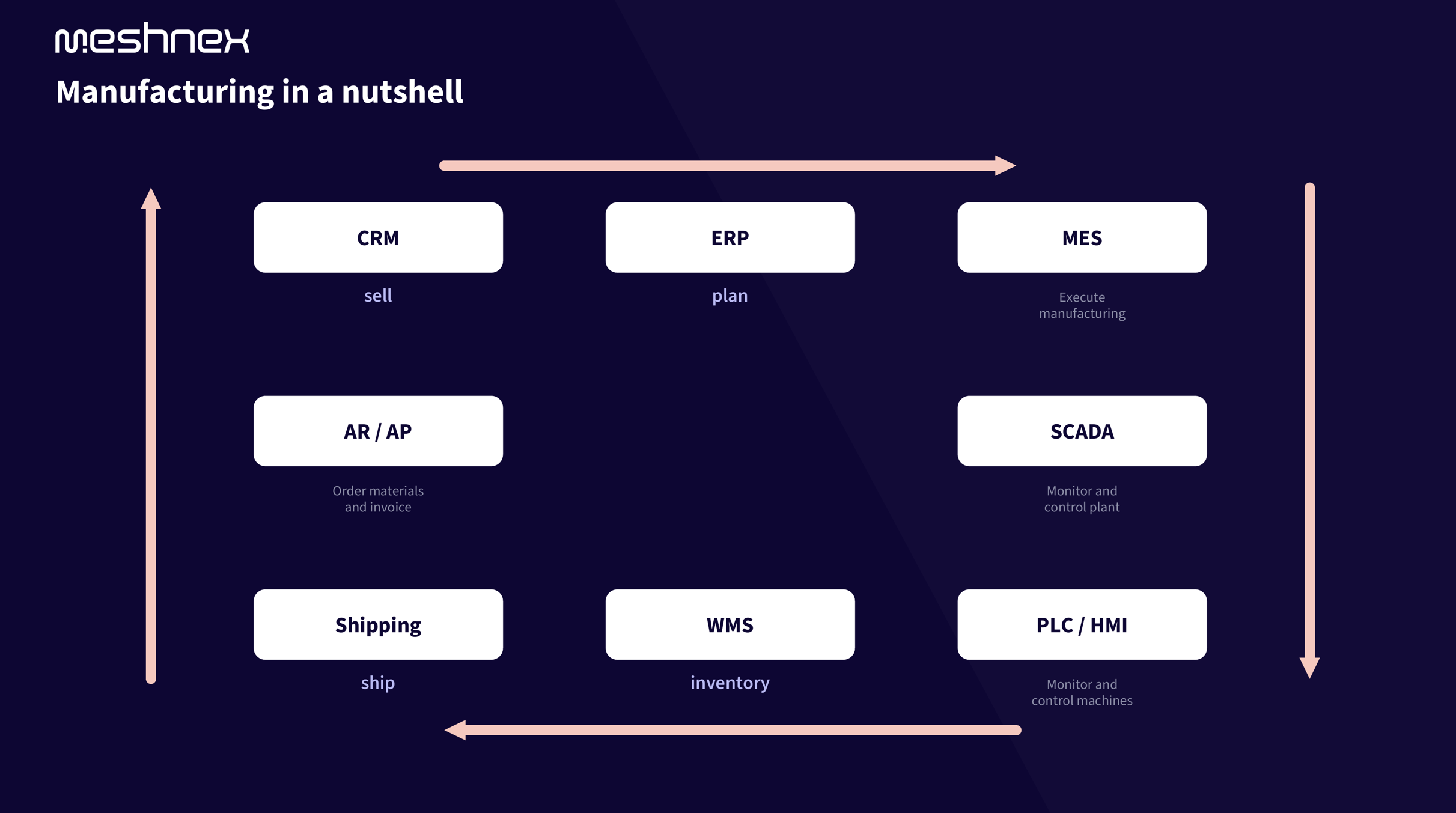
Follow one order around the picture. Sales closes it in the CRM. The ERP plans it: which material, which week, which work centre, at what cost. The MES executes it: this order on this machine now, with this operator and this batch of raw material. SCADA and the PLC run the machines. The WMS books the pallets, shipping sends them, invoicing closes the loop and the ERP compares what the order cost with what it planned.
ERP and MES are neighbours on that loop, not rivals. The order passes from one to the other and comes back as a result. And the handover between them, in both directions, is where most factories leak: plans that reach the floor as a printed job ticket, and results that reach the ERP as a booking typed in after the shift.
What the ERP does: plan and account
In the ISA-95 standard the ERP sits at level 4, the layer that works in months, weeks and days. That time frame says everything about the job. The ERP holds customer orders, the bill of materials, routings, stock, purchasing, cost prices and invoices. It answers: what do we need to make, by when, with what, and what did it cost?
The ERP learns about production through bookings. An operator confirms an operation: so many good, so many scrap, so many hours. In most packages the material consumption is then posted automatically from the bill of materials, the so-called backflush: the standard quantity per piece times the confirmed yield, not what the line actually used. That is efficient, and it is also why ERP stock and cost drift away from reality within weeks when scrap goes unreported or a substitute material is used.
None of this is a shortcoming. The ERP is a system of record for transactions. It knows the plan and the booking. It does not know what happened in between, and it was never built to.
In the Netherlands the ERP is a given: 93% of manufacturers with 50 to 250 employees run one, and 67% of those with 10 to 50. So the real question is never "ERP or MES". It is what your ERP cannot see.
What the MES does: execute and prove
The MES sits at level 3, which works in shifts, hours, minutes and seconds. It takes the orders the ERP released and runs the shift with them: which order goes on which machine now, who is working, which work instruction is on the screen, which batch of raw material goes in. While the order runs it collects what happens: counts, stops and their reasons, quality checks, process values. Afterwards it proves what happened: this batch, on this machine, at this time, with these settings.
MESA, the association that defined the field, listed eleven functions in 1997 that still cover the job: resource allocation, detailed scheduling, dispatching, document control, data collection, labour management, quality management, process management, maintenance management, product tracking and genealogy, and performance analysis. In plain words: the MES answers "what is happening now?" and "what happened on line 2 at 14:22 last Tuesday?"
Side by side
| ERP | MES | |
| The question it answers | What should we make, with what, at what cost? | What is happening on the line right now, and what happened? |
| Time frame | Months, weeks, days | Shifts, hours, minutes, seconds |
| Unit of work | An order, a booking, an invoice | An event: a start, a stop, a count, a check |
| Where the data comes from | People entering bookings | Machines, sensors and operators at the line |
| Who works in it | Planning, purchasing, finance, sales | Operators, team leaders, quality, maintenance |
| Typical output | Stock position, cost price, delivery date | OEE, downtime Pareto, batch record, shift report |
What flows between them, and where it goes wrong
ISA-95 describes the exchange in four objects: down go the definition (how to make it) and the schedule (what to make, and when); up go the capability (what is available) and the performance (what was made and what was used). In practice the ERP sends orders, quantities, due dates, bill of materials, routing and batch numbers down. The MES sends back started, finished, good, scrap, material consumed, time spent, and the batch or serial numbers that went into each product. Microsoft's integration specification for Dynamics 365 lists exactly these messages: start order, report good and scrap quantity with a cause, report material consumption, report time, end order. SAP does the same with IDocs down and BAPI confirmations up.
The exchange is standardised, and yet it is where projects stall. Rockwell Automation surveyed 1,560 manufacturers in 2026: 93% have an MES in at least one plant, but only 23% have it fully integrated with ERP, PLM, quality and OT. 44% name integration as their top buying requirement, and 43% admit they don't effectively use the data they collect. Three reasons come up every time:
- Master data lives twice. Routings, work centres and standard times are maintained in the ERP and again in the MES, and the two drift apart.
- Confirmations come late. If the MES only gets its counts from an operator at the end of the shift, the ERP is as blind as before, only now with an extra system in between.
- Nobody owns the boundary. The ERP consultant, the MES vendor and the machine builder each stop at their own interface.
"Our ERP has a production module, isn't that enough?"
Sometimes. Most ERPs sell a shop floor module: a job list on a tablet, a start/stop button, quantities typed in, status updated in the ERP. Exact's Shop Floor Control is exactly that. For a job shop with a few machines, long operations and no traceability demands, it does the job, and an MES on top would be an expensive second place to type the same thing.
What such a module does not do is listen to the machine. It does not read the PLC, so it does not see a 30-second microstop, it cannot tell a changeover from a breakdown, and it cannot calculate OEE from what the equipment actually did. It does not link a quality check to the batch that was running, and it cannot reconstruct which raw material lot went into which product. The ERP vendors say so themselves: Dynamics 365 keeps machine data in a separate preview feature that is "not meant for production use", and SAP handles it in a connector layer outside the ERP core.
So the honest test is the question you cannot answer today. If it is "how many hours did we book on order 4512?", the ERP module is enough. If it is "why did line 2 lose three hours yesterday?" or "which batches got the film from that one supplier?", you need level 3 functions: something that listens to the machine and stores events with their context.
Why so many factories run their MES in Excel
IoT Analytics estimates that 54% of small and mid-sized plants use pen and paper or spreadsheets as their MES. Dutch manufacturing looks no different: an April 2026 survey by FME, Koninklijke Metaalunie and partners found that at 80% of companies the use of data and sensors is still insufficiently developed.
The reasons are rational. A spreadsheet needs no project. A classic MES does: a requirements list of hundreds of lines, a selection that takes months, an implementation that takes a year. Smart Industry puts the starting budget at €15,000 to €40,000 for a small plant and €40,000 to €100,000 for a larger one, before the organisation has changed a single habit. And LNS Research is blunt about the outcome: 75% of manufacturing software initiatives fail to deliver meaningful results, MES included, mostly for organisational reasons rather than software ones.
There is a second, quieter reason. An MES tells the truth, and the truth is uncomfortable at first. One MES vendor reports that in eight out of ten rollouts the OEE drops by 15 to 20% in the first week, because downtime is now measured instead of estimated. That is not the system failing. It is the first honest number the plant has ever had, and improvement starts from there.
The layer both systems are missing: the machine itself
Neither the ERP nor the MES reads a PLC natively. Both need a connection layer underneath: something that speaks S7, Modbus or OPC UA on one side and delivers clean, labelled events on the other. In most factories that layer is built per project, per system and per vendor, and it is the first thing to break on the next update.
The alternative is to build it once. Every machine publishes its state to one shared data layer, a unified namespace, with its context attached: site, line, machine, order, batch. The ERP reads counts and consumption from there. The MES, if you have one, reads the same events. The dashboard, the shift report and the AI model read them too. That is the principle behind our IT-OT integration work: one connection per system instead of a line between every pair.
MES functions you can get without buying an MES
MeshOS is that data layer with the level 3 functions built on top, one at a time, on the machines you already have. How that works as an MES system on your existing machines has its own page; this is how we cover the MES functions in practice:
- Production and downtime registration straight from the PLC. Every stop counted and classified, a live Pareto per shift. At a packaging manufacturer that replaced downtime typed into Excel after the shift. See the live OEE dashboard and production downtime monitoring.
- Quality records linked to the batch. Checks on a screen at the line instead of on paper, every result stored with order, machine and time: paperless quality logbooks. At Daelmans a 3D laser camera measures every stroopwafel and logs it per line and per batch.
- Track and trace. At an electronics manufacturer every product is scanned through the chain: product to box, box to pallet, pallet to order. At Valeo machine data and end-of-line test results reach the IT landscape over a segmented network, every product traceable.
- Recipes and settings. At a food manufacturer recipes that only lived on paper and in ageing Siemens PLCs are now versioned, with every setpoint change logged: who, what, when, and what it did to production.
- Shift reports written from the data instead of from memory, ready for the morning meeting.
- Confirmations to the ERP. Counts, scrap and consumption go to SAP, Exact, AFAS or an industry package as they happen, not after the shift. Backflush becomes actual consumption.
Where a classic MES is the better choice, we say so. Finite scheduling across dozens of lines with shared tooling, validated environments where every step is enforced and signed off (pharma, medical devices), or step-by-step enforcement on complex assembly: those are jobs for a dedicated MES. In those cases MeshOS is the layer under it. It delivers the machine data the MES would otherwise collect through its own connectors, and the ERP still reads from the same place.
Where to start
- Connect one machine, read-only. We do that for free; the first live dashboard is usually up within 48 hours.
- Get one number everyone trusts. Counts and stops from the PLC end the debate about whose number is right.
- Send that number to the ERP. Confirmation becomes automatic, backflush becomes actual consumption.
- Add functions as the pain dictates: downtime reasons, quality checks, batch traceability, shift reports.
- Decide about a full MES with data in hand. By then you know which of the eleven functions you really use.
Frequently asked questions about MES and ERP
Is an MES part of an ERP?
No. An ERP is a system of record for orders, stock, purchasing and money, working in days and weeks. An MES runs and records production in shifts, minutes and seconds. Many ERPs sell a shop floor module that covers a small part of the MES job: job lists, start/stop and quantities typed in. Machine data, downtime reasons, OEE and batch genealogy are not in it.
Can an ERP replace an MES?
Sometimes. A job shop with a few machines, long operations and no traceability demands can run production on the ERP's shop floor module alone. As soon as you need to know why a line stopped, which lot went into which product, or what the OEE really is, you need level 3 functions that listen to the machine, whether they come from an MES or from a data layer like MeshOS.
Do I need an MES if I already have an ERP?
That depends on the question you cannot answer today. If it is about hours and quantities per order, the ERP suffices. If it is about downtime, quality per batch, traceability or OEE, you need something that collects events from the line. That does not have to be a full MES package: start with one machine and one function, and decide about the rest with real data.
What is the difference between MES and MOM?
Mostly the word. MOM, manufacturing operations management, is the ISA-95 term for everything at level 3: production, quality, maintenance and inventory operations. MES is the product category that vendors sell for it. LNS Research uses MOM for the layer and MES for the products, and that is a useful habit.
What does connecting an MES to an ERP cost?
Less than the systems themselves, if the interface is designed once. Orders and master data go down, confirmations, consumption and batch numbers go up, in a handful of standard messages that SAP and Dynamics document. The cost sits in the master data that has to match on both sides and in the people who own the boundary. The vendor figures for a full MES project vary from tens of thousands to several hundred thousand euros; the interface is a small part of that if it is built on one data layer instead of per system.
Conclusion: not a contest, a handover
MES vs ERP is the wrong question. The ERP plans and accounts, the MES executes and proves, and the order travels from one to the other and back. The gap in most factories is not a missing system but a missing layer: the machine data that neither the ERP nor the MES reads on its own. Lay that layer once, and the confirmations, the OEE, the batch records and the shift reports come from the same place, whether or not you ever buy an MES.
That is what Meshnex builds. Read how MeshOS brings your machine data together, see what we did for others in our client cases, or connect one machine for free and see what your own data is worth.