

AI vision station for meat processors
Every crate identified. Nobody typing.
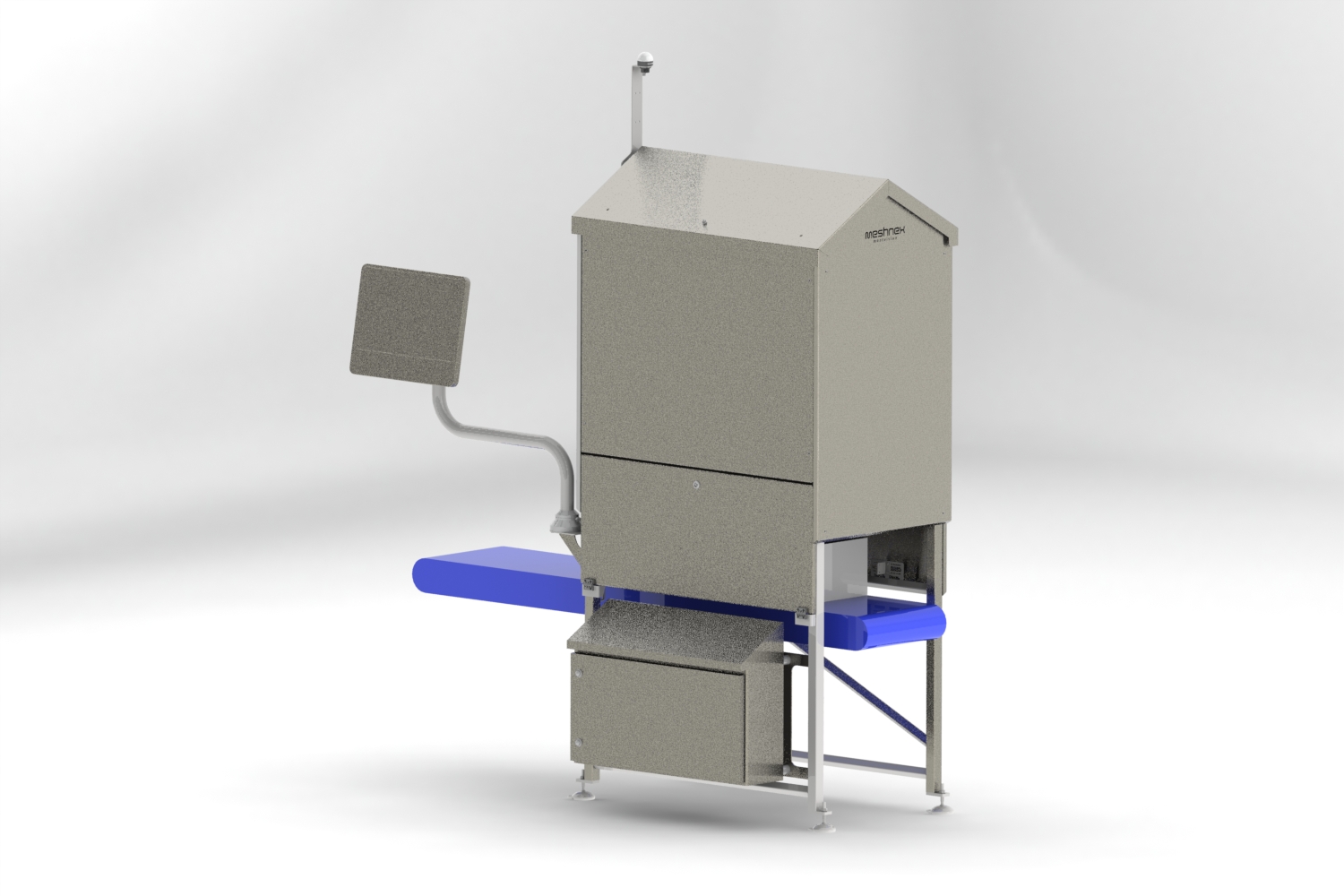
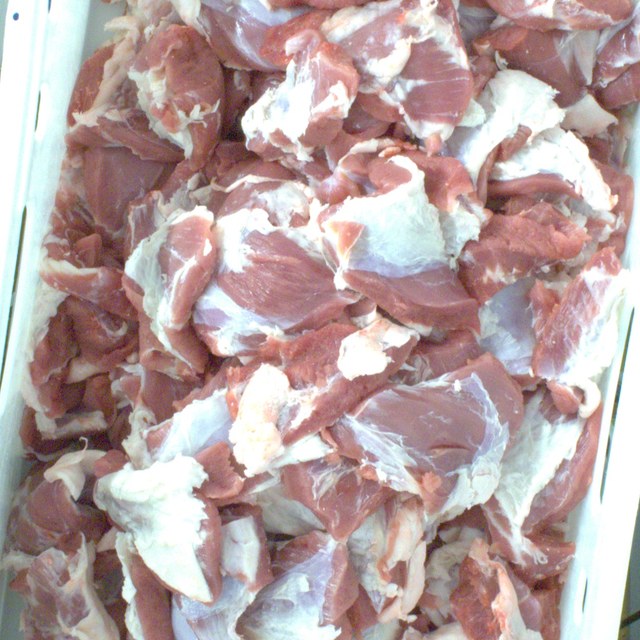
Today someone looks into every crate and types a product code. MeatVision does it with AI vision: the camera recognises the cut inside and links it to the crate, while the crate keeps moving.
- Stopped or in flow
- Learns from your own line
- Images stay on your site
Crate record
Crate 0048 2291 7
Pork belly, skin-off
11.6 kg
Linked and routed to pallet 12
In plain terms
What actually happens at the camera
After cutting or deboning, the crate passes under the MeatVision station. It reads the crate's barcode, recognises the cut inside, links the weight, and sends one complete record to your ERP, MES or line control: automatically, without a stop.
What this means on the floor
No more typed product codes
Nobody enters what the camera already sees. Fewer registration errors, on every shift, without adding a step.
Kilos per cut, not just crates
Weight travels in the same record as the product code, so you know exactly how many kilos of each cut you produced, not just how many crates passed.
Numbers while production runs
Yield, batch progress and traceability update as the crate passes, not in tomorrow's report.
The problem
The most repeated decision in your plant is still made by hand
At the indexing point an operator looks into every crate and enters a product code. Thousands of times a shift. Ham or shoulder, this trim or that one: cuts that look almost the same, at line speed.
One wrong keystroke sends a crate the wrong way
Onto the wrong pallet, into the wrong department, out on the wrong order. Someone has to find it, pull it back and re-book it. Or the customer finds it first.
Mistakes are invisible
A wrong code does not stop the line. It shows up later: in stock that doesn't add up, a wrong delivery, a yield figure nobody trusts.
The line waits for a person
Every crate stops until someone has looked and typed. Your throughput is set by the slowest manual step.
It is repetitive work nobody wants
Hard to staff, harder to keep staffed.
Nobody knows the error rate
There is no second opinion on any crate, so there is nothing to measure against.
Everything downstream is built on that one keystroke: routing, palletising, stock, orders, traceability.
Who it's for
Built for meat-cutting and deboning plants
MeatVision fits pork, beef and veal plants where someone still looks into a crate and types a product code by hand.
- Crates hold different cuts after deboning, cutting or trimming, and someone has to tell them apart by eye.
- A product code is typed in today, at an indexing point that already exists on your line.
- A wrong code has already put a crate on the wrong pallet, in the wrong order, or in front of a customer.
- You want a real number for yield, product mix, traceability or batch progress, not an estimate from tomorrow's report.
- The indexing job is hard to staff and harder to keep staffed.
- You're planning automatic sorting, palletising or tighter warehouse integration, and every one of those needs a crate it can already identify.
How it works
Barcode and contents, read in one pass. No stop, no typing.
Six steps, well under a second, while the crate keeps moving.
- 1
The crate arrives
Moving through on the conveyor, or stopped at an existing indexing point: MeatVision handles both. A photocell or your line control tells it the crate is there.
- 2
The barcode is read
MeatVision scans the crate's barcode itself, so it knows which crate it is looking at. No separate scanner to buy or integrate.
- 3
The camera fires
A sealed hood with strobed lighting freezes the crate in motion and takes the same picture every time, regardless of conveyor speed, factory light, wet surfaces or glare.
- 4
The model decides
An AI model trained on your products, running on a computer inside the station, names the cut in a fraction of a second.
- 5
Crate and product are linked
Barcode and product code go to your ERP, MES and line control as one record, exactly as if an operator had entered it. The crate is routed to the right pallet, the right department, the right order.
- 6
Doubt goes to a human
Below the confidence you set, MeatVision stays quiet, a beacon lights up and an operator decides: at the line, or at a side lane so the flow keeps moving. That answer becomes training data.
Before and after
| Manual indexing | With MeatVision | |
|---|---|---|
| Crate at the indexing point | Manual indexing: Stops and waits for an operator | With MeatVision: Passes through in flow |
| Identifying the crate | Manual indexing: Separate scanner, or typed | With MeatVision: Barcode read by the station |
| Identifying the product | Manual indexing: Operator looks and types a code | With MeatVision: Recognised by the camera |
| Wrong code | Manual indexing: Crate lands on the wrong pallet or in the wrong department; found later, if at all | With MeatVision: Doubtful crates are flagged before they are routed |
| Record per crate | Manual indexing: A code | With MeatVision: Code, barcode, photo, confidence, timestamp |
| Operator | Manual indexing: Tied to the line all shift | With MeatVision: Handles exceptions only |
Why it works
Built around the things that make vision projects fail
Most AI vision projects don't fail on the model. They fail on labelling, on lighting and on trust. So that is where we started.
It learns from your own line, without a labelling project
Your operators already label every crate, every day. MeatVision photographs each crate and matches the photo to the code that was entered. Thousands of labelled images a day, at zero extra labour. Your butchers review only the doubtful ones: a few hours a week.
It proves itself before it touches anything
For weeks the model runs in shadow: it answers every crate, and nobody sees the answers. You get its error rate on your real production, next to something you have never had before: your current manual error rate. If the model is bad, nothing happens.
It knows when it doesn't know
Every answer carries a calibrated confidence. You choose the trade-off, per product: send more crates to a human and errors approach zero, send fewer and you save more labour. Either way, you are always measured against your own operators' current error rate.
Products go automatic one at a time
A cut runs on its own only after it has earned it. If a product's appearance changes, for example a new supplier or a new trim spec, MeatVision notices and sends that product back to human checking. The rest keep running.
The picture is controlled, so the model doesn't have to guess
Closed hood, fixed camera, strobed LED lighting with cross-polarisation to remove glare from wet meat and plastic. Colour and fat tone are what separate one cut from another. We protect that signal in the hardware instead of hoping software can recover it.
Stopped or in flow
Strobed lighting and a short exposure freeze a moving crate as sharply as a standing one. Start at the indexing point you have today, where crates stop. Remove the stop when you are ready. Same station, same model.
It keeps watching itself
Confidence, reject rate and product mix are monitored continuously. A dirty lens, a failing light or a new product shows up as an alert, not as a month of wrong codes. A weekly photo audit replaces the second pair of eyes.
Rollout
Four phases. The line is never at risk.
The camera earns its place step by step. For the first two phases nothing changes for your operators at all.
- 1
Collecting
The camera photographs every crate. Operators work as always; their entries label the photos.
What changes on your line
Nothing
- 2
Learning
The model runs live in shadow mode. Butchers review only the disagreements.
What changes on your line
Nothing
- 3
Assisted
The model suggests; the operator confirms or overrides. Short by design: long enough to prove the connection to your systems and earn trust.
What changes on your line
Operator sees a suggestion
- 4
Working
The model writes the code and the crate moves on. People handle only what the model hands back.
What changes on your line
Operator freed for other work
Each phase ends on numbers you agree to in advance, not on a date.
The station
Built for the production floor, not the lab
One station per identification point. Add stations as you add lines.
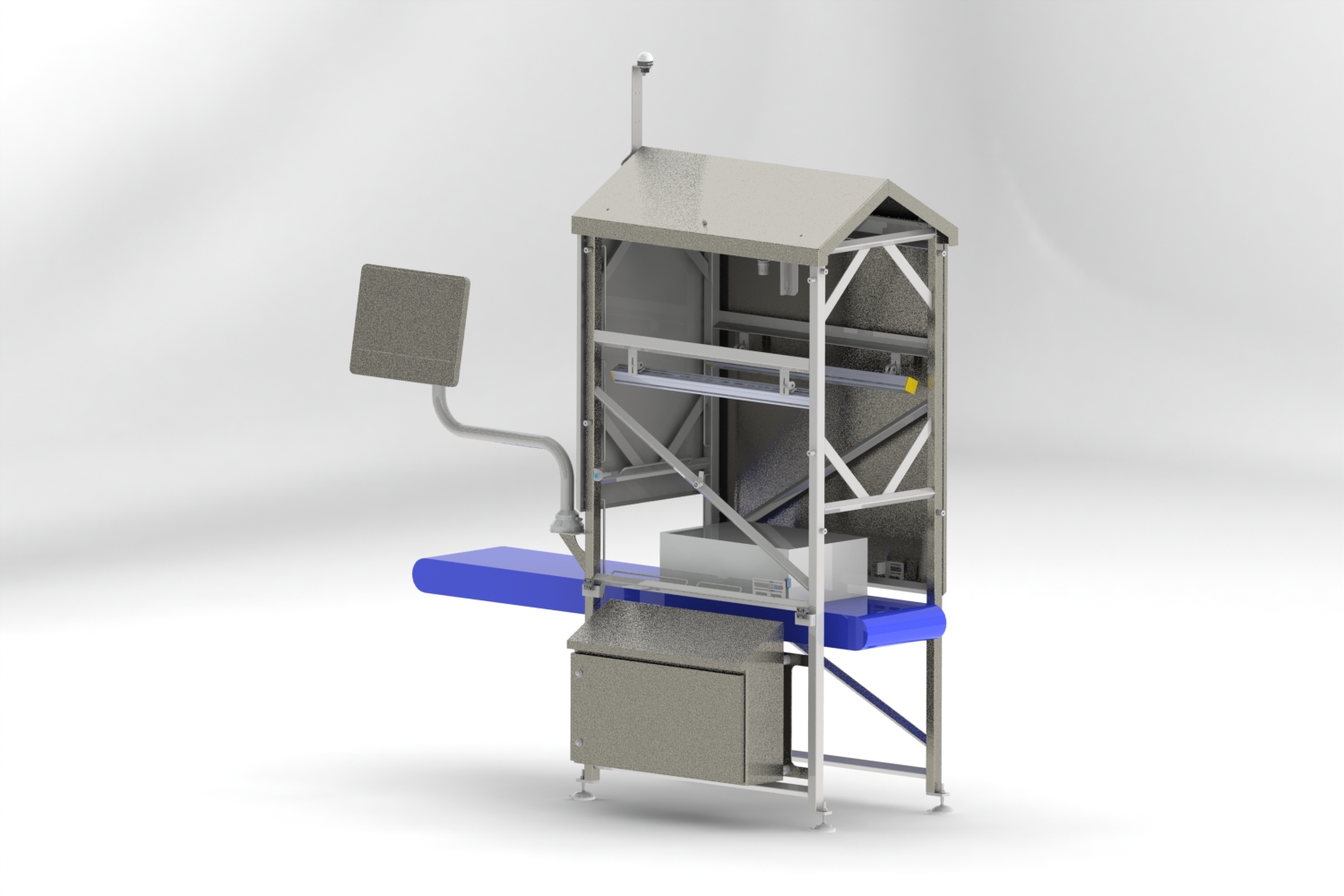
- Sealed, washdown-ready stainless enclosure with sloped surfaces, so nothing collects.
- Closed hood: the picture does not depend on ambient factory light.
- Industrial camera at a short working distance, rigidly mounted against vibration.
- Strobed industrial LED lighting with cross-polarisation.
- Captures crates stopped or moving, and reads the crate barcode in the same pass.
- Edge computer inside the station: the decision is there in well under a second.
- Designed for standard 600 × 400 mm meat crates.
Integration
Fits the plant you already have
MeatVision sits next to your line control, your ERP and your network. It asks none of them to change.
What you get
What changes when the camera takes over
More than indexing
Every crate becomes a data point
The station already sees every crate that leaves the department. Once it knows which crate and which product, the same pass can answer the questions your production office asks all day. Start with indexing; switch on modules as you need them.
Included with every station
Weight, linked to the crate
Net weight per crate, from an in-line scale in the station or from the scale you already have, stored in the same record as barcode, product and photo. Weight is also a second check on the camera: a crate whose weight doesn't fit its product is flagged before it is routed.
Optional modules: switch on as you need them
Live yield
Kilos per cut, per batch, per lot, per supplier, as it happens instead of in tomorrow's report. See by mid-morning that today's lot is giving less ham and more trim than it should, while there is still time to do something about it.
How far is my batch?
A live progress bar per batch and per order: crates and kilos done, what is still expected, estimated finish time. Planning sees when an order is complete; the line stops overproducing what nobody ordered.
Quality on every crate instead of a sample
Fat cover and visual lean against the trim spec, with trend alerts when a line drifts. Pale or dark meat flagged per crate and tracked per supplier. Bruising, blood spots, visible bone or rind where it shouldn't be. Blue plastic, glove pieces and liner fragments on the surface. Two products in one crate, caught before it reaches the customer.
Crate checks
Overfilled and underfilled crates, damaged or dirty crates, unreadable or missing labels, the wrong crate colour for the product: sorted out before they cause a stop downstream.
Feedback in minutes
When fat cover on line 3 creeps up, the foreman sees it within minutes on a screen at the line, not the next day in a complaint. Quality control moves from inspecting a sample to steering the process.
Supplier and lot scorecards
Yield, quality and product mix per supplier and per lot, built automatically. Hard numbers for purchasing and for the next price conversation.
Performance per line and shift
Crates and kilos per hour, per deboning line, per shift. Slow-downs and micro-stops become visible without anyone filling in a form.
Order verification
Contents checked against the active order as crates pass: the right product, in the right quantity, for the right customer, before the pallet is wrapped.
The complaint answered in one minute
Customer claims a wrong or poor delivery? Scan the barcode and see the photo, the weight, the time and the line of that exact crate.
Surface temperature
An infrared sensor in the hood logs the surface temperature of every crate: a cold-chain record per crate instead of per room.
Ready for what comes next
The digital layer your automation is waiting for
Robots, automatic palletisers and sorters, autonomous transport: none of them can work with a crate they cannot identify. As long as a person has to look and type, every step after the indexing point inherits that person's speed and that person's mistakes.
MeatVision gives every crate a reliable digital identity the moment it enters the flow: which crate, which product, how sure, with a photo to prove it. Available in real time to any system that needs it.
Robotic palletising and picking
The robot knows what it is lifting, and where it belongs.
Automatic sorting and routing
By product, order or customer, with no operator in the loop.
Live stock and yield
What was actually produced, per cut, as it happens.
Order checking
Crate contents verified against the order before it leaves the department.
Open interfaces
MQTT and REST, so the next machine you buy can simply subscribe.
Automate the indexing point today, and the rest of the line has something to build on.
Frequently asked questions
Do crates have to stop?
No. Strobed lighting and a short exposure freeze a moving crate. If your crates stop at an indexing point today, MeatVision works there as it is, and lets you remove the stop later.
Do we need a separate barcode scanner?
No. The station reads the crate's barcode itself and links it to the product it recognises. If your line control already tracks crates, MeatVision can use that instead.
What else can the station measure besides the product code?
Weight, fill level, fat cover, colour, visible defects and foreign objects, and crate condition. From those follow live yield, batch progress and supplier scorecards. Start with indexing; switch on modules as you need them.
How many products can it tell apart?
Dozens per station. High-resolution images matter here: the difference between two similar cuts lives in texture and fat structure that ordinary image recognition throws away.
Some of our cuts look nearly identical. What then?
The first model tells you exactly which pairs it confuses. Most are solved with more examples of those pairs. Some products cannot be separated by eye at all: same cut, different weight class or customer. For those MeatVision can use what your system already knows, such as weight or the active order. And where it still isn't sure, it says so.
What happens with a new product?
It goes to an operator. The model hasn't seen it, so confidence is low. Those entries become the training data for the next model version.
What if the model gets worse over time?
Then that product goes back to human checking. Drift monitoring and a weekly audit of confident decisions catch it, per product, without stopping the rest.
Does it replace our operators?
It replaces the typing. People stay in the loop for everything the model hands back, and your butchers are the ones who teach it.
Why not just show suggestions to the operator permanently?
Because people who are shown an answer tend to agree with it, right or wrong. Research on human-AI teams shows the combination often performs below the better of the two alone. We keep the assisted phase short and measure it with blind control crates.
Do you need to change our PLC or line control?
No. MeatVision only reads.
How long until it runs on its own?
That depends on how quickly your rarest products appear in front of the camera. Common cuts are ready in weeks; rare ones take longer. Phases end on agreed numbers, not calendar dates.
Where are images stored?
On your site. Nothing leaves your network unless you decide it should.
Does it work for beef, poultry or fish?
In principle, yes. The method is the same for any product that is identified by eye in a crate or tray. Every plant starts with a model trained on its own products, so what matters is whether a trained eye can tell your products apart. Talk to us about yours.
Book a demo
See it on your own crates
Send us a few hundred photos of your products, or let us put a camera over one line for a week. You will see which of your cuts a camera can tell apart, before you commit to anything.
What happens next
- 1
A call with an engineer
Half an hour about your line, your crates and your product codes. No sales deck.
- 2
A test on your own products
You send photos, or we place a camera over one line for a week.
- 3
You see what the camera can tell apart
Per product, including the pairs it confuses. Then you decide whether a pilot makes sense.