
MeatVision

AI vision station for meat processors

Automatic recognition of meat cuts on the line

Today someone looks into every crate and types a product code. MeatVision does it with AI vision: the camera recognises the cut inside and links it to the crate, while the crate keeps moving.

The MeatVision station in stainless steel with the hood open: the LED light bars and the camera inside, above the conveyor, the operator screen on an arm, the status beacon on top and the cabinet under the belt

The most repeated decision in your plant is still made by hand. Everything downstream is built on that one keystroke: routing, palletising, stock, orders, traceability.

  • One wrong keystroke sends a crate the wrong way

    Onto the wrong pallet, into the wrong department, out on the wrong order. Someone has to find it, pull it back and re-book it. Or the customer finds it first.

  • Mistakes are invisible

    A wrong code does not stop the line. It shows up later: in stock that doesn't add up, a wrong delivery, a yield figure nobody trusts.

  • The line waits for a person

    Every crate stops until someone has looked and typed. Your throughput is set by the slowest manual step.

How it works

One crate, from the belt to a finished record

Scroll down and ride through the station with one crate. Nobody stands next to it, nobody types a thing.

  1. Scale

    The crate rides in under the hood, onto the scale

    Under the hood, the scale records the crate's net weight. That number goes into the record next to the product, and it checks the camera too: a crate whose weight doesn't fit the recognised product gets flagged.

    11.6 kg
  2. Lighting

    Strong, even light for every picture

    LED bars under the closed hood light every crate the same way. Cross-polarisation takes the glare off wet meat and film, and hall light stays outside, so the night shift gets the same picture as the day shift.

  3. Camera

    A professional picture of every crate

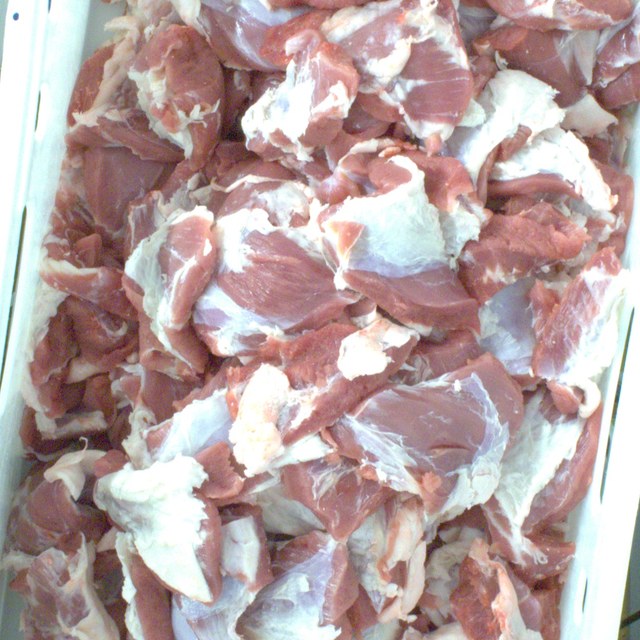
    An industrial camera looks down and takes a sharp, high-resolution picture, always under the same conditions. What tells a ham from a shoulder is the texture and tone of the fat, so the model gets the full picture, not a thumbnail.

    What the camera sees
  4. Computer

    The decision is made in the station, not in the cloud

    In the cabinet under the belt, a computer runs the model trained on your products. The answer is ready in a fraction of a second, without a server or the internet. Images stay on disks in your plant, and a UPS keeps the station running through a short power dip.

  5. Operator screen

    Record done, the crate rolls on

    Barcode, product, weight and photo reach your ERP, MES or line control as one record. The operator sees every crate on the screen. Below the confidence you set, the beacon lights up and a person decides. That answer teaches the model.

    Crate record

    Crate 0048 2291 7

    Pork belly, skin-off

    confidence 98.7%

    Linked and routed to pallet 12

  6. Whole station

    One station per indexing point

    Stainless steel that takes a washdown, with sloped surfaces so water runs off. The station goes in at the indexing point you use today and only reads from your PLC. Add a line, add a station.

The station

See it from every side

Turn the station, open the enclosure and pick a part. Every one is built to order, around your line.

Parts of the station

  • Factory light stays outside.

    Sealed stainless steel that takes a washdown, with sloped surfaces so water runs off and nothing collects. The closed hood shuts out hall light, so the day shift and the night shift get the same picture.

  • The same picture of every crate.

    An industrial camera at a short working distance, rigidly mounted so line vibration does not blur the shot. Every crate is photographed the same way, so the model always compares like with like.

  • No glare on wet meat.

    Cross-polarised LED bars give strong, even light for every picture and take the glare off wet meat and plastic. Colour and fat tone are what separate one cut from another, so they have to stay readable.

  • When the model is unsure, a person decides.

    Shows every crate as it passes: the recognised product, the confidence and the photo. Below the confidence you set, MeatVision stays quiet and the operator decides here. That answer becomes training data.

  • No need to watch the screen.

    Lights up when a crate needs a human decision, so the operator at the line knows straight away without keeping an eye on the screen.

  • The decision is made inside the station.

    The edge computer that runs the AI model sits in this cabinet: the answer is there in well under a second, without waiting on a server. A UPS keeps it running through a short power cut.

  • Standard crates, the line you have.

    Built for standard 600 × 400 mm meat crates and for the indexing point you use today.

Drag to turn the station. Pick a part to see it up close.

What you get

What changes when the camera takes over

The right crate in the right place

No more crates on the wrong pallet, in the wrong department or on the wrong order. And no more searching, pulling back and re-booking.

Flow instead of stops

Crates no longer wait for a person. The indexing point stops being the bottleneck.

Fewer wrong codes

Measured against your own baseline, on your own crates, before the model decides anything.

A photo of every crate

Tied to barcode, lot and timestamp. When a customer asks what was in the crate, you can show them.

It learns from your own line, without a labelling project

Your operators already label every crate, every day. MeatVision photographs each crate and matches the photo to the code that was entered. Thousands of labelled images a day, at zero extra labour. Your butchers review only the doubtful ones: a few hours a week.

It knows when it doesn't know

Every answer carries a calibrated confidence. You choose the trade-off, per product: send more crates to a human and errors approach zero, send fewer and you save more labour. Either way, you are always measured against your own operators' current error rate.

More than indexing

What one pass can tell you

The station already sees every crate that leaves the department. Once it knows which crate and which product, the same pass answers the questions your production office asks all day.

Weight, linked to the crate

From the scale in the station or the one you already have.

The net weight of every crate goes into the same record as barcode, product and photo. It is also a second check on the camera: a crate whose weight doesn't fit the recognised product is flagged before it moves on.

Live yield

Kilos per cut, batch and supplier, as it happens.

Yield counted as the crates pass, not in tomorrow's report. You see by mid-morning that today's lot is giving less ham and more trim than it should, while there is still time to act.

How live yield works in the deboning room

How far is my batch?

Crates and kilos done per batch and order.

A live progress bar per batch and per order: crates and kilos done, what is still to come and when the batch will be finished. Planning sees when an order is complete, and the line stops making what nobody ordered.

Order verification

The right product and quantity, before the pallet is wrapped.

Crates are checked against the active order as they pass: the right product, in the right quantity, for the right customer. A mistake shows up at the line, not at the customer.

Foreign bodies

Blue plastic and glove pieces on the surface.

The camera already looks down into every crate, so it also sees what shouldn't be there: blue plastic, glove pieces and liner fragments on the surface of the meat. That crate is flagged before it reaches packing. One limit: the camera only sees what lies on top, so it does not replace your metal detector.

Open, no lock-in

Works with your ERP, MES and line control.

The crate record reaches your systems through an interface that already exists: an API, a message queue, or the same input path as the terminal it replaces. The station only reads from your line control, so nothing changes in your PLC. Photos and records stay on your own storage, in your plant.

How MeatVision fits a digital meat plant

Crate checks

Overfilled, damaged, unlabelled: caught before they stop the line.

Overfilled and underfilled crates, damaged or dirty ones, unreadable or missing labels, the wrong crate colour for the product. The station sorts them out before they cause a stop further down the line.

The complaint answered in one minute

Scan the code and see the crate's photo, weight and time.

A customer says the delivery was wrong or short? Scan the barcode and you see the photo, the weight, the time and the line of that exact crate. Evidence instead of a discussion.

Rollout

Four phases. The line is never at risk.

The camera earns its place step by step. For the first two phases nothing changes for your operators at all.

  1. 1

    Collecting

    The camera photographs every crate. Operators work as always; their entries label the photos.

    What changes on your line

    Nothing

  2. 2

    Learning

    The model runs live in shadow mode. Butchers review only the disagreements.

    What changes on your line

    Nothing

  3. 3

    Assisted

    The model suggests; the operator confirms or overrides. Short by design: long enough to prove the connection to your systems and earn trust.

    What changes on your line

    Operator sees a suggestion

  4. 4

    Working

    The model writes the code and the crate moves on. People handle only what the model hands back.

    What changes on your line

    Operator freed for other work

Each phase ends on numbers you agree to in advance, not on a date.

Questions

Frequently asked questions

  • Which plants is it for?

    MeatVision fits pork, beef and veal plants where someone still looks into a crate and types a product code by hand.

  • Do crates have to stop?

    No. Strobed lighting and a short exposure freeze a moving crate. If your crates stop at an indexing point today, MeatVision works there as it is, and lets you remove the stop later.

  • How many products can it tell apart?

    Dozens per station. High-resolution images matter here: the difference between two similar cuts lives in texture and fat structure that ordinary image recognition throws away.

  • Some of our cuts look nearly identical. What then?

    The first model tells you exactly which pairs it confuses. Most are solved with more examples of those pairs. Some products cannot be separated by eye at all: same cut, different weight class or customer. For those MeatVision can use what your system already knows, such as weight or the active order. And where it still isn't sure, it says so.

  • What happens with a new product?

    It goes to an operator. The model hasn't seen it, so confidence is low. Those entries become the training data for the next model version.

  • What if the model gets worse over time?

    Then that product goes back to human checking. Drift monitoring and a weekly audit of confident decisions catch it, per product, without stopping the rest.

  • Does it replace our operators?

    It replaces the typing. People stay in the loop for everything the model hands back, and your butchers are the ones who teach it.

  • Do you need to change our PLC or line control?

    No. MeatVision only reads.

  • Where are the images, and what goes over the network?

    Images and results stay on your site, on your storage. Nothing leaves your network unless you decide it should. The model decides inside the station, so the line keeps running even if the network or the internet doesn't. The station has two clearly defined network flows that your IT and OT teams can review in one meeting.

  • How long until it runs on its own?

    That depends on how quickly your rarest products appear in front of the camera. Common cuts are ready in weeks; rare ones take longer. Phases end on agreed numbers, not calendar dates.

  • Does it work for beef, poultry or fish?

    In principle, yes. The method is the same for any product that is identified by eye in a crate or tray. Every plant starts with a model trained on its own products, so what matters is whether a trained eye can tell your products apart. Talk to us about yours.

Book a demo

See it on your own crates

Send us a few hundred photos of your products, or let us put a camera over one line for a week. You will see which of your cuts a camera can tell apart, before you commit to anything.

What happens next

  1. 1

    A call with an engineer

    Half an hour about your line, your crates and your product codes. No sales deck.

  2. 2

    A test on your own products

    You send photos, or we place a camera over one line for a week.

  3. 3

    You see what the camera can tell apart

    Per product, including the pairs it confuses. Then you decide whether a pilot makes sense.

Prefer to talk to an engineer first? Call +31 85 401 0906 or email info@meshnex.nl.